You mapped the URLs you knew about. Google remembers the rest.

Redirect Ninja reads 16 months of your Search Console history, past the 1,000-row export cap, so you can see every URL that stopped working and what it used to earn.

Get your free damage report

You did the redirects. Most people do, and most people get the ones they can see: the URLs on the old sitemap, the pages a crawl of the new site turns up, whatever Search Console will hand over.
‍
That list has a ceiling. Search Console's export stops at 1,000 rows, the old sitemap goes when the old store does, and a crawl only finds pages that still exist. Google has been keeping score for 16 months, and it still has traffic data for URLs that appear on none of them. Most of it would only reach you secondhand, from a customer who hit a dead link or a recrawl weeks later. The report reads Google's record instead, and it runs in minutes.
What the free report shows

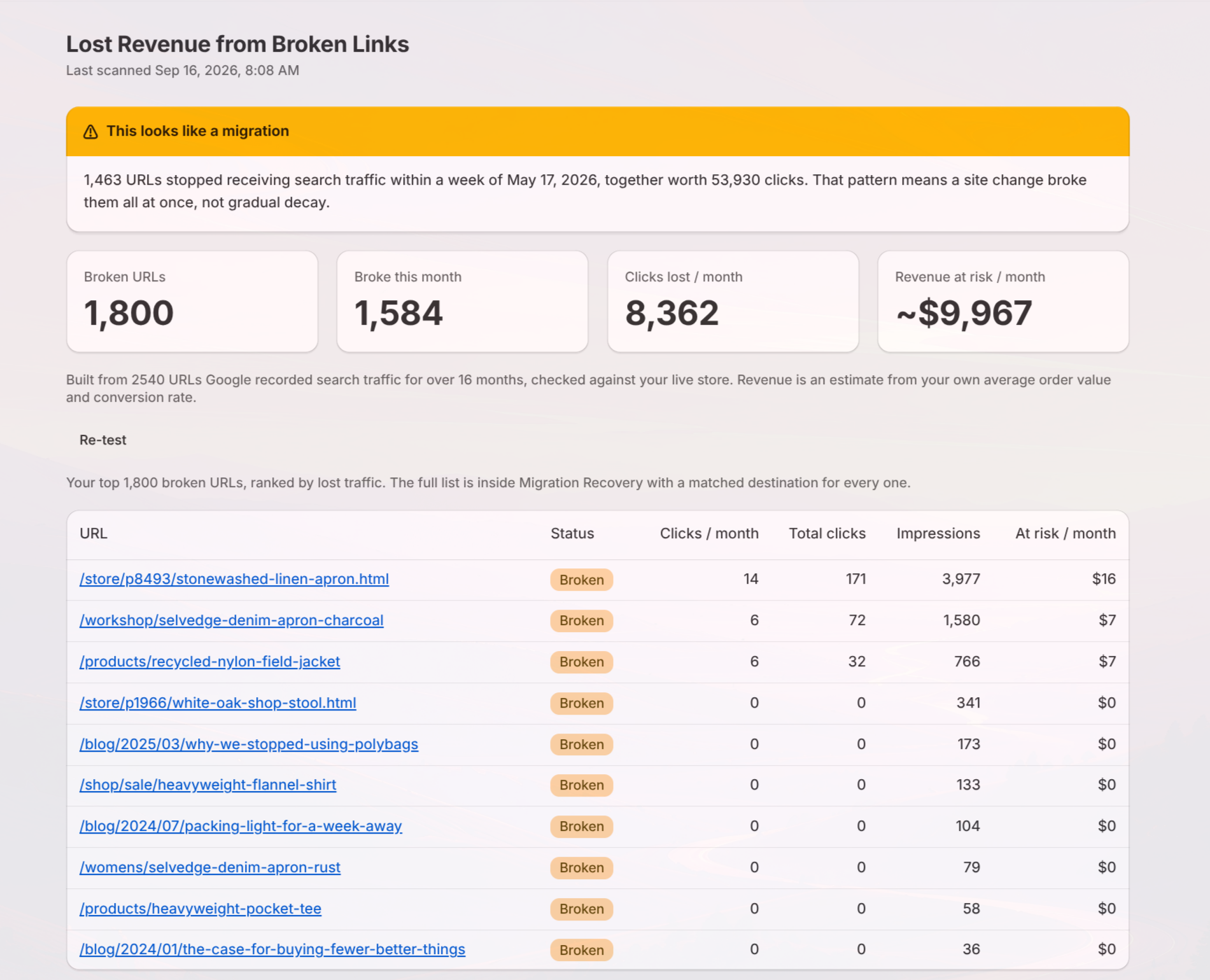
Connect Search Console and the Damage Report runs on your own history. You get the totals: how many URLs broke, how many broke this month, how many clicks a month you're losing, and what that's worth at your own average order value and conversion rate.

You also get ten of those URLs in full, drawn from across the range rather than the top ten, so you can check any of them against Google yourself.
Report titled 'Lost Revenue from Broken Links' last scanned Sep 16, 2026, 8:08 AM, showing a warning that 1,463 URLs stopped traffic within a week of May 17, 2026, indicating a site change broke links at once. Summaries show 1,800 broken URLs, 1,584 broke this month, 8,362 clicks lost monthly, and estimated revenue at risk of about $9,967 per month. Data built from 2,540 URLs over 16 months. A table lists top 10 broken URLs with their status as 'Broken' and metrics for clicks per month, total clicks, impressions, and revenue at risk, showing mostly zero clicks and low revenue risk for many URLs.

The fix, in order

Matched. Every broken URL gets checked against your live store and paired with the closest live page for it.

Scored. Each match carries a confidence score, and you set the line. Above it, matches apply themselves. Below it, nothing moves without you.

Reviewed. Anything under your line lands in a queue, one row per URL, with what it used to earn. Approve it, reject it, or change the target.

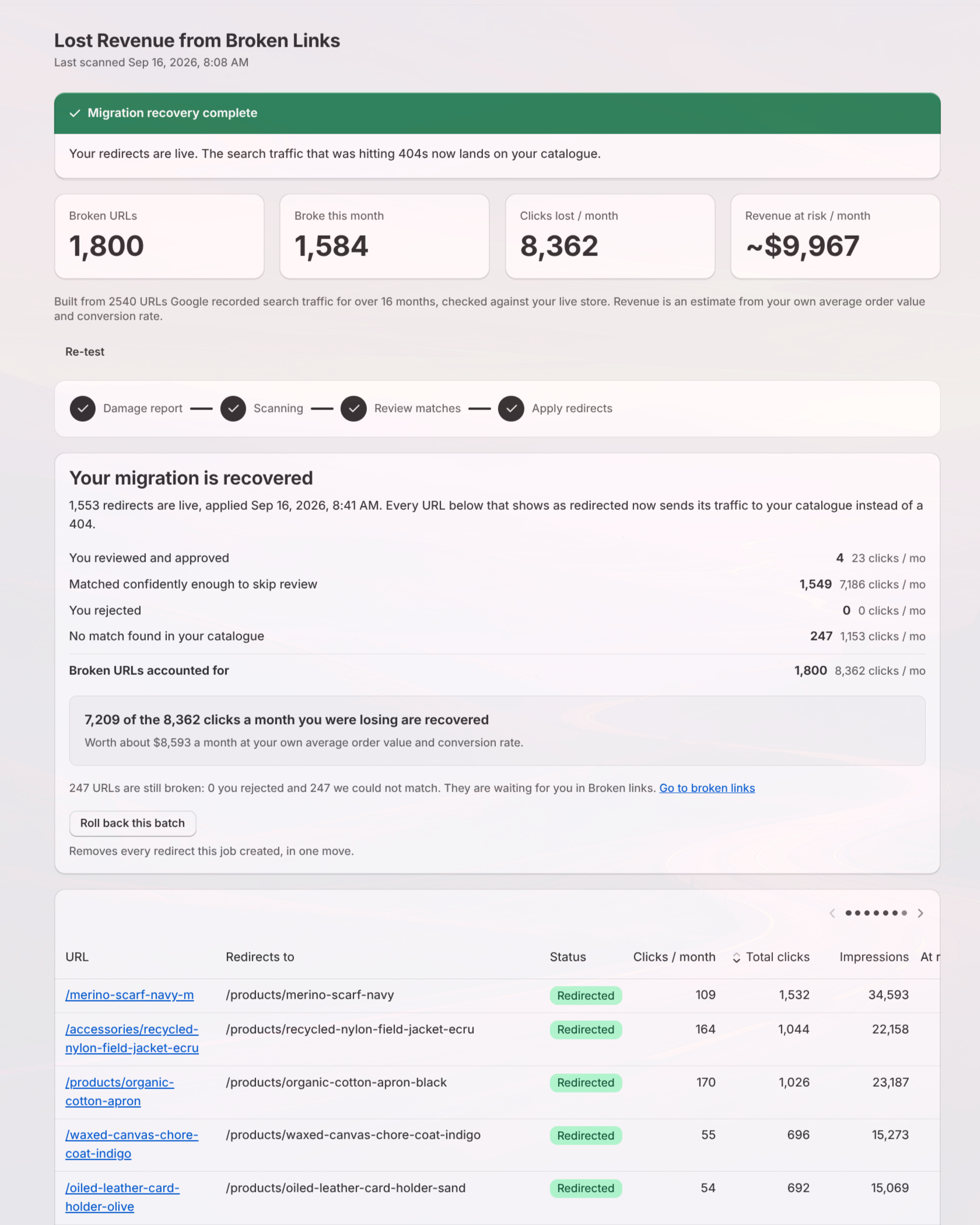
Applied. Preview the whole batch first, then it goes live in one move, the same day you approve it.

Reversible. One click rolls the whole batch back if needed.
‍
Dashboard showing lost revenue from broken links with a green banner stating 'Migration recovery complete.' Key stats include 1,800 broken URLs, 1,584 broken this month, 8,362 clicks lost per month, and approximately $9,967 revenue at risk monthly. Below is a summary stating 1,553 redirects are live as of September 16, 2026, and 7,209 of the 8,362 lost clicks per month are recovered, worth about $8,593 monthly. A table lists URLs redirected to new product pages, their redirected status, monthly clicks, total clicks, and impressions.

What we promise

If the report doesn't surface broken URLs with real historical traffic that Shopify and Search Console never showed you, you don't pay.

If it isn't applied the same day you approve the batch, it's free.
The report is free to run. Fixing what it finds is a one-time fee, scaled to how many clicks you're losing.

Find out what your migration cost you

Connect Search Console and the report runs on your own history. The totals are free.

Get your free damage report

Simple light gray lightning bolt icon on transparent background.

Running migrations for clients?

Same thing on their store, before you hand it back to them. So when they ask what the migration cost them, you already have the number. Get in Touch