

Broken links eventually become inevitable when running a Shopify store. Some common actions such as product changes, collection updates, or migrating platforms to Shopify can compound the number of broken links on your store.
Short answer
Shopify does not support wildcard redirects natively. The current Shopify redirect tools only allow you to create redirects manually one by one.To create wildcard redirects, you need a redirect app that can match URL patterns and redirect multiple URLs at once using rules.
What is a wildcard redirect?
A wildcard redirect lets you redirect many URLs that follow the same pattern to a single destination. Wildcards often use `*` to denote "anything can go here but the rest of the URL must match."
For example:
/old-products/*→/collections/new-products/products/discontinued-*→/collections/sale/*/category/product→/collections/*/all
Instead of creating hundreds of individual redirects, one rule handles all matching URLs.
Who this is for
This guide is for Shopify merchants who:
- Are seeing a growing number of 404 errors reported in their Google Search Console.
- Manage a large or frequently changing product catalog
- Migrated from another platform like BigCommerce, WooCommerce, or SquareSpace
When you should use wildcard redirects
Wildcard redirects are only useful when multiple broken URLs follow a clear pattern.
Common scenarios include:
- Platform migrations where old URL structures no longer exist
- Renaming collections or reorganizing product paths
- Cleaning up discontinued or legacy product URLs
- Fixing large batches of 404 errors efficiently
If you only have a few broken links, manual redirects may be sufficient. At scale, wildcard redirects save significant time.
How to create wildcard redirects in Shopify
Option 1: Shopify’s native redirects (manual, limited)
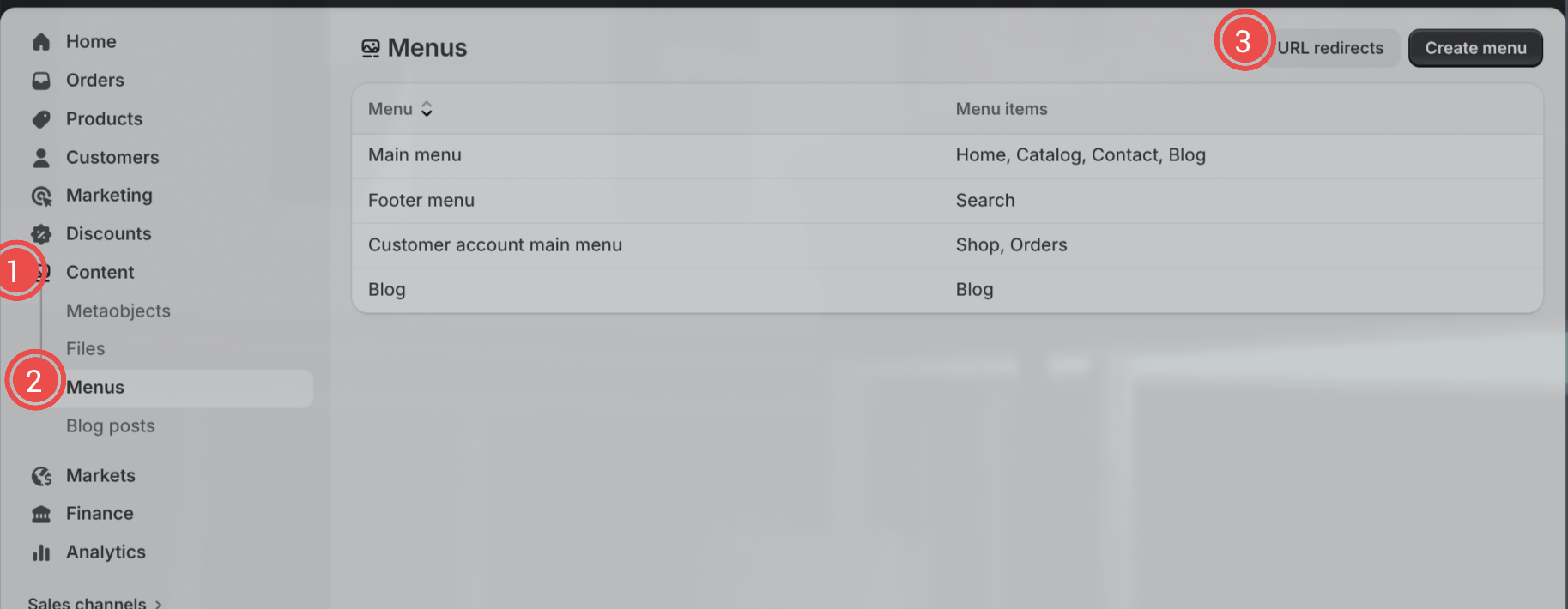
- Open Shopify Admin
- Go to Content → Menus → URL Redirects
- Add a redirect for one URL at a time
Limitations
- No wildcard or pattern matching
- Each redirect must be created individually
- Not practical for stores with many broken links
Option 2: Use an app that supports wildcard redirects (recommended)
- Install a redirect app that supports wildcard rules
- Define a source pattern. Commonly using
* - Set the destination URL
- Test the rule using multiple sample URLs
- Save the rule
Some redirect apps also track 404 errors automatically and help identify patterns based on real visitor traffic. For example, **Redirect Ninja** -> LINK helps merchants find broken URL patterns, safely test wildcard rules, and create permanent 301 redirects directly from Shopify admin.
Once active, matching URLs are redirected automatically. Most apps create permanent 301 redirects to preserve SEO value.
Example wildcard redirect patterns
/old-collection/*→/new-collection/products/discontinued-*→/collections/sale/category/*/product/*→/collections/*/products/*
These patterns allow you to cover hundreds or thousands of URLs with a single rule.
Common mistakes to avoid
- Creating overlapping rules without understanding which one takes priority.
- Redirecting everything to the homepage, which can harm SEO
- Skipping testing before activating a wildcard rule
- Creating a redirect loop or chain(Creating a redirect that then points to another redirect. Shopify usually will not allow this by default)
Fastest path vs manual path
Fastest path
Use an app like Redirect Ninja that handles wildcard matching, testing, and automatic redirect creation for you.
Manual path
Create individual redirects directly in Shopify, one URL at a time, and manage them manually.
FAQ
Does Shopify support wildcard redirects by default?
No. Shopify only supports one-to-one URL redirects out of the box.
Are wildcard redirects good for SEO?
Yes, when used correctly. They help preserve link equity and prevent users from landing on broken pages. You want 301 redirects for good SEO practices.
Can wildcard redirects create 301 redirects?
Yes. Most redirect apps create permanent 301 redirects automatically.
Should I use wildcard redirects for every redirect?
No. Use wildcard redirects only when multiple URLs follow a clear and consistent pattern.