
Shopify migrations often feel complete on launch day. Products are live, collections are organized, and the storefront looks better than before. From the outside, everything appears to be working.
What’s less obvious is what happens underneath in the weeks that follow.
In many migrations, broken URLs don’t surface immediately. They appear gradually, often tied to links that predate the most recent platform change. These links can originate from old blog posts, external referrals, bookmarks, or even migrations that happened years earlier.
Migration doesn’t reset URL history
One common assumption during migrations is that the most recent platform defines the scope of the redirect work. In practice, URL history tends to stretch further back.
In one recent migration we reviewed, the store had moved to Shopify from a regional eCommerce platform. Years earlier, that same store had migrated from Magento. Each transition left behind URLs that continued to circulate long after the platforms themselves were retired.
During the Shopify migration alone, more than 10,000 legacy URLs needed to be accounted for.
Many of those URLs were not part of the current sitemap, and some were not actively tracked anywhere. They only surfaced once customers or search engines attempted to access them.
Why redirect exports don’t capture full URL history
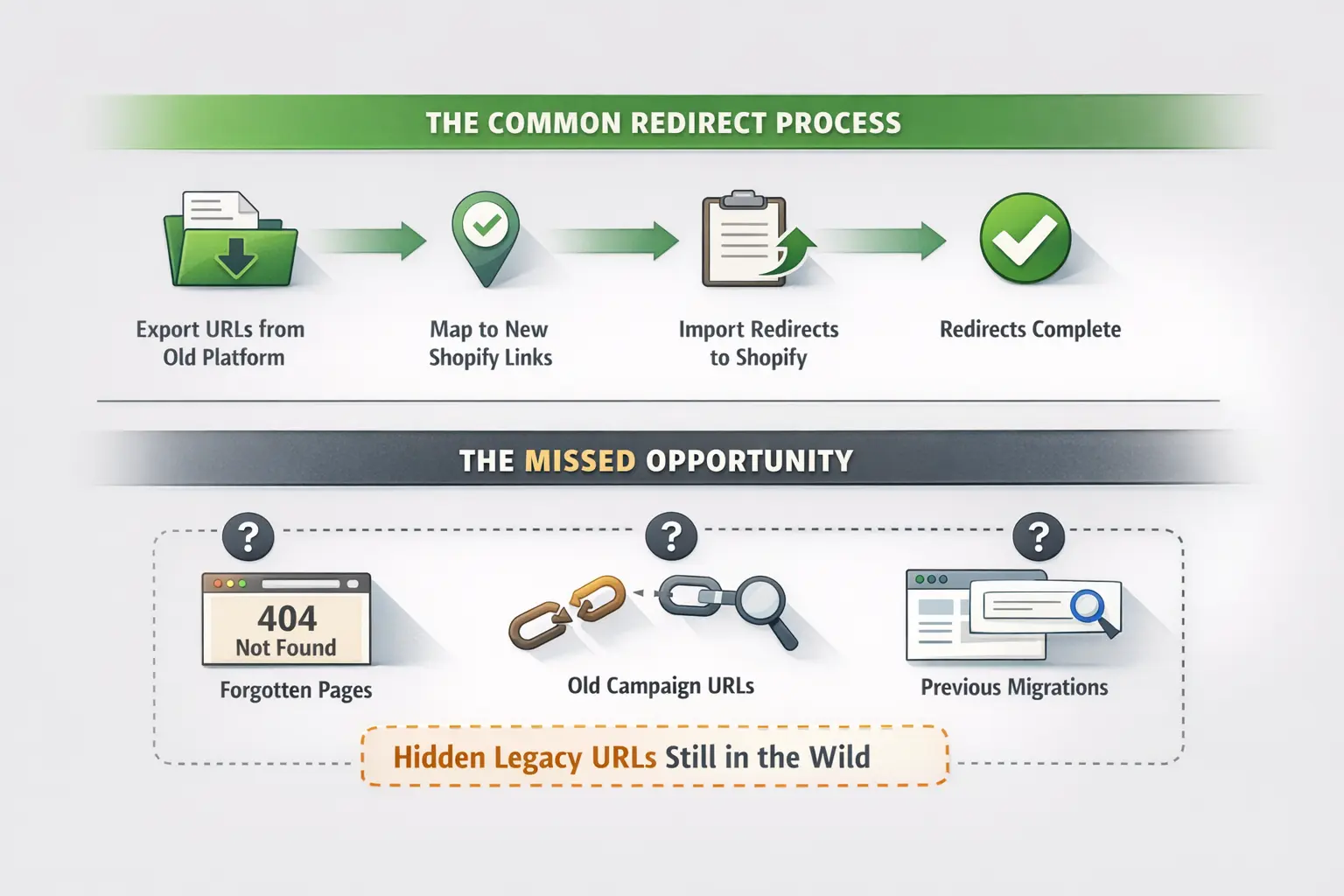
During most platform migrations, the initial redirect plan is straightforward: export all known URLs from the previous platform, map them to their new Shopify equivalents, and import those redirects into Shopify.
This approach can work when a store is relatively new or when URL history is limited to a single platform. At larger scales, however, it becomes less reliable.
Exports typically reflect only the URLs that exist in the most recent system. They often exclude older pages, retired categories, past campaign URLs, or paths created during earlier migrations. Even when a migration is carefully planned, many legacy URLs are simply not present in the export data.
This gap usually isn’t visible at launch. In many migrations, the Shopify storefront, checkout, and catalog go live without issues. The bulk of 404 errors begin appearing days to weeks later, once customers, search engines, and external sites attempt to access long-forgotten paths.
Post-launch 404s commonly originate from:
- Old inbound links
- Archived marketing campaigns
- Retired category pages
- URLs carried forward from previous migrations
In this case, several broken URLs traced back to a Magento setup that predated the most recent platform entirely. These pages were no longer remembered internally, but they were still being accessed externally.
At thousands of URLs, redirect management becomes less about mapping effort and more about ongoing visibility. Without a way to detect and review missing URLs as they appear over time, export-based planning struggles to keep up with the full scope of legacy traffic.
AI-assisted discovery changes visibility
Once AI Redirects were enabled, the store gained visibility into broken URLs that had not been anticipated during migration planning.
AI Redirects identified missing URLs based on real traffic and suggested destinations using contextual analysis. Suggestions were routed to relevant products or collections, where applicable.
Importantly, suggestions were reviewed manually before being approved. This kept control with the merchant while reducing the time spent discovering and evaluating redirect candidates.
In several cases, the AI surfaced URLs the team didn’t remember existing at all.
Measured SEO impact
As redirects were reviewed and deployed, the impact became visible in Google Search Console.
The number of reported 404 errors dropped by approximately 90%.
This reduction wasn’t tied to a single event or bulk import. It occurred gradually as redirects were approved and made live, reflecting how legacy traffic continued to surface over time.
From an SEO perspective, this provided reassurance that older URLs were being handled as they appeared, rather than accumulating silently.
Time savings during migration cleanup
Alongside improved visibility, the time impact was noticeable.
The team estimated saving 10+ hours during the redirect cleanup phase. This time was largely associated with:
- Reduced manual URL discovery
- Faster evaluation of redirect destinations
- Less repetition across similar URL patterns
For a migration of this size, that time savings allowed attention to stay focused on post-launch stabilization instead of redirect mechanics.
Confidence in AI-assisted redirects
When asked to compare AI-generated suggestions to manual redirects, confidence was described as roughly equivalent.
In some cases, the AI produced redirect targets that were more relevant than what would have been selected manually, particularly when dealing with older or loosely structured URLs.
This reinforced the value of a review-based workflow:
- AI handles discovery and suggestion
- Humans retain approval and oversight
The result was a balance between speed and accuracy.
A pattern worth noting for Shopify merchants
Several themes from this migration show up repeatedly in complex Shopify transitions:
- URL history often spans multiple platforms
- Exported redirect lists rarely capture all legacy URLs
- Many broken links appear after launch, not before
- Manual redirect planning struggles at higher volumes
- Visibility into 404s changes how teams prioritize cleanup
- Ongoing review matters as much as initial setup
Redirect management rarely ends on launch day. For stores with long operational histories, it becomes an ongoing maintenance concern rather than a one-time task.
If this pattern sounds familiar, this is the type of migration scenario Redirect Ninja – AI 404 Fix was built to support.
The gaps described here are visible if you read Google's record instead of your own export. See what your migration actually broke.
Attribution
This article is based on a real Shopify migration. The merchant reviewed and approve use of their experience. You can view their store here: Visit Store